Smart Cockpit
Smart Cockpit is a runnable qwen-audio-agent scenario example. Users can naturally control the vehicle, plan routes, play music, check the weather, place flash-buy orders, and run custom workflows while the cockpit UI reflects vehicle and task state.
Demo
Use natural voice for vehicle control and navigation, with cockpit UI updates. Long-running background work can continue alongside foreground conversation.
Core features
- Continuous conversation, natural interruption, multi-turn context, and runtime voice and persona switching.
- MCP-based vehicle control, navigation, music, weather, flash-buy, and custom workflow tools.
- A foreground Realtime fast path for low-latency operations and a backend Agent for flash-buy and multi-source news research. Custom-skill creation, loading, and foreground workflow steps stay in the foreground.
- A replaceable backend Agent connected through A2A 1.0, with ACP and custom adapters available as alternatives.
- Scenario-owned HTTP/SSE channels for vehicle, route, music, and order state.
- Multiple foreground tool calls finish before one combined spoken response; foreground MCP calls have a configurable 10-second default timeout.
- Screen route preferences silently update conversation context. UI climate
−/+changes can trigger a user-saved temperature reminder once on entry into its range, without repeated reminders while the condition remains true. - Memory follows the standard Markdown tools and prompt policy. Background news reports use real searches and source-page reads while foreground chat continues, returning a full text artifact and a short summary with verification limits.
Architecture
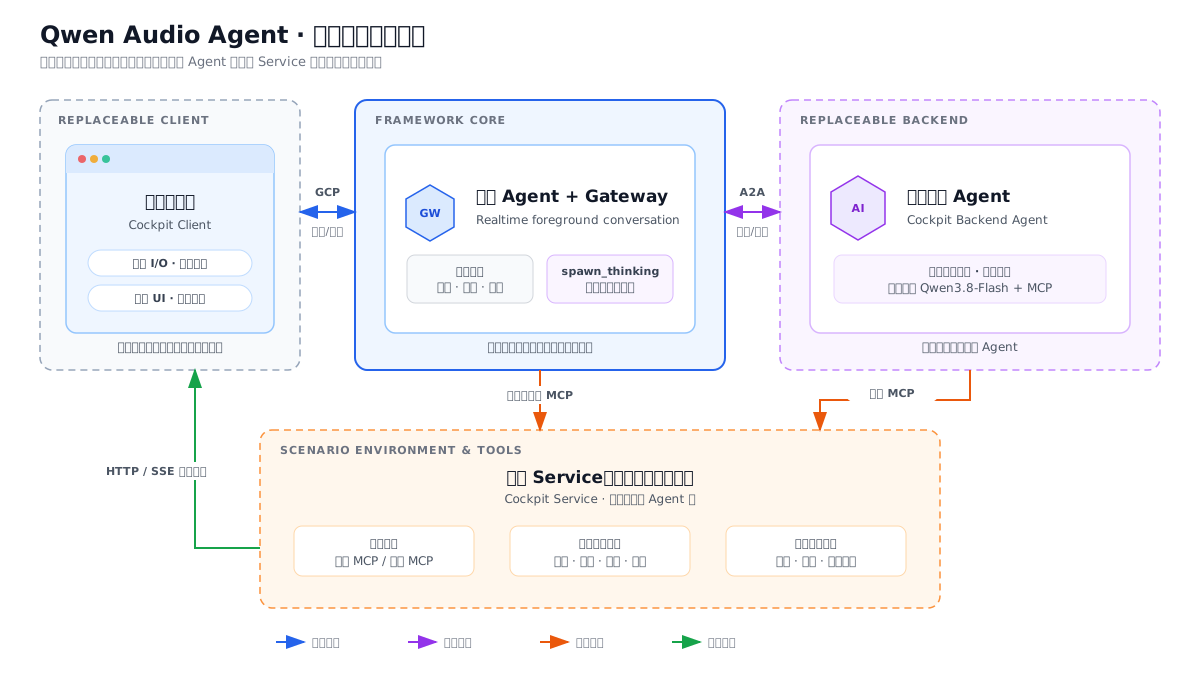
The foreground supports both realtime conversation and direct tool calls; long-running or backend-routed work goes to the cockpit Agent without blocking conversation. The Service supplies shared scenario state, business rules, and tool execution for both paths.
| Component | Example implementation | Main interfaces |
|---|---|---|
client/ | React cockpit UI + Browser Audio | GCP 7.0 / Gateway Client SDK |
gateway/ | qwen-audio-agent Gateway + foreground Realtime Agent | GCP / MCP / BackendPort |
agent/ | Qwen3.8-Flash backend Agent | A2A 1.0 / MCP |
service/ | Cockpit state, rules, tools, and external integrations | HTTP/SSE / MCP |
See examples/smart-cockpit/docs/architecture.md for complete boundaries and data flows.
Tool calling
The cockpit Service provides 38 MCP tools across six scenario domains:
| Domain | Count | Main capabilities |
|---|---|---|
vehicle | 11 | Location and state, climate, windows, lights, charging, and other controls. |
navigation | 12 | Place search, routing, waypoints, favorites, and route preferences. |
music | 10 | Search, playback, previous/next track, volume, media source, and favorites. |
weather | 1 | City weather lookup. |
flashbuy | 1 | Flash-buy product search and ordering demonstration. |
custom-skills | 3 | List, create/update, and load workflows or temperature-reminder rules. |
By default, vehicle, navigation, music, weather, and custom skills expose 37 Service tools to the foreground; flash-buy exposes 1 Service tool to the backend. The Realtime base total is 44: 7 Gateway built-ins + 37 foreground MCP tools, before capability-gated tools such as frontend search are added. Scenario developers can change this routing in service/tools/surface-routing.json.
The backend also uses 2 framework retrieval tools, web_search and fetch_url, through the public qwen-audio-agent/web-retrieval factory. They are not counted in the 38 scenario tools and preserve the existing provider configuration and safe webpage-reading protections. See web search; the default keyless search is an experimental fallback, not a live-news guarantee.
Run the example
cp examples/smart-cockpit/.env.example examples/smart-cockpit/.env.local
# Set DASHSCOPE_API_KEY in .env.local; map keys are optional.
npm run example:smart-cockpit:install
npm run example:smart-cockpit
Open http://localhost:5173. The command starts service, agent, gateway, and client together.
Benchmark
The accuracy suites cover vehicle, navigation, music and weather, not flash-buy, custom skills or long-running background tasks.
- Short cases: 86 cases and 111 user turns; expected calls cover 34 tools. Results use full-case pass rate.
- Long dialogue: 10 separately designed 50-turn conversations, covering 22 of those tools. The results page reports per-turn behavior across 250 tool-required and 250 no-tool turns.
- Paths: Text, controlled Realtime, and full Harness. Harness uses production frontend composition, with different prompts, tool outputs and runtime guards.
- Tool-placement latency: direct frontend calls versus backend delegation, with Realtime in both paths. Test turns requiring tools are not steps to finish one task or the number of valid timing samples.
Numerical tables are maintained in the accuracy results and recorded latency results. See the Benchmark guide for definitions, provenance, limitations and reproduction commands.
Replace and extend
| Goal | Change |
|---|---|
| Replace the cockpit UI or audio I/O | client/ |
| Replace the backend Agent | Change COCKPIT_AGENT_CARD_URL or replace agent/ |
| Add scenario tools, state, or external services | service/ and service/tools/ |
| Change foreground personas or backend-task semantics | gateway/ |
See the component replacement guide for the complete migration path.
Authors and acknowledgements
- Zhang Binbin: designed and expanded the cockpit domain capabilities, including navigation, vehicle-control and music tools, foreground/backend routing, and evaluation cases.
- Li Xu: designed and implemented the scenario on qwen-audio-agent, including the client, Gateway and backend Agent boundaries, realtime voice path, and A2A/MCP integrations.
- Peng Zhendong: provided the original cockpit UI and visual assets, including the overall interface design, interaction patterns, and related visual materials.